What Is a Crypto Wallet?
A crypto wallet is a tool that allows you to store, send, and receive cryptocurrencies. Despite the name, wallets do not actually store your coins. Instead, they store the private keys that prove ownership of your assets on the blockchain. Think of it like this: the blockchain is the bank vault, and your wallet holds the key to your specific deposit box.
Choosing the right wallet is one of the most important decisions you will make as a crypto investor. The wrong choice can expose you to hacks, loss of funds, or simply make your daily trading workflow unnecessarily complex. This guide breaks down every wallet type, explains when you need one, and covers the security practices that protect your holdings.
Hot Wallets vs. Cold Wallets
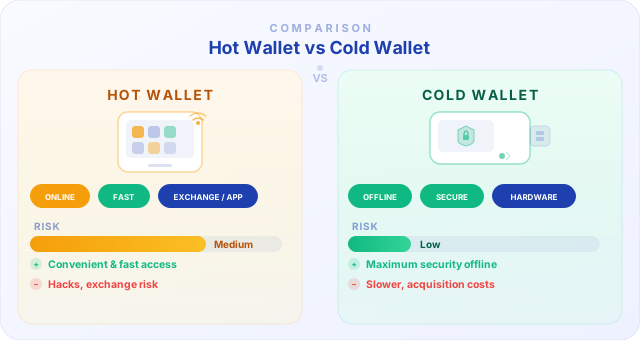
The most fundamental distinction in crypto wallets is whether they are connected to the internet (hot) or completely offline (cold). Hot wallets include mobile apps, browser extensions, and desktop applications. They are convenient for frequent trading and everyday transactions, but their internet connection makes them more vulnerable to hacking attempts, phishing attacks, and malware.
Cold wallets, on the other hand, keep your private keys entirely offline. Hardware wallets and paper wallets fall into this category. Because they never touch the internet during normal operation, they are virtually immune to remote hacking. The trade-off is convenience: accessing your funds requires physically connecting the device or importing keys, which takes extra steps.
Hardware Wallets: Ledger and Trezor
Hardware wallets are physical devices that store your private keys on a secure chip. The two most popular brands are Ledger and Trezor. Ledger devices (Nano S Plus, Nano X, Stax) use a certified secure element chip and support over 5,500 cryptocurrencies. Trezor devices (Model One, Model T, Safe 3) are fully open-source and have been on the market since 2014.
Both brands connect to your computer or phone via USB or Bluetooth. Transactions are signed on the device itself, meaning your private keys never leave the hardware. Even if your computer is compromised with malware, an attacker cannot extract your keys. Prices range from around $60 for entry-level models to $280 for premium devices with touchscreens.
For most investors holding more than $1,000 in crypto, a hardware wallet is a worthwhile investment. The small upfront cost is negligible compared to the security it provides for your portfolio.
Software Wallets
Software wallets are applications you install on your phone or computer. Popular examples include MetaMask (browser extension for Ethereum and EVM chains), Trust Wallet (mobile, multi-chain), Phantom (Solana ecosystem), and Exodus (desktop and mobile with built-in exchange). These wallets are free, easy to set up, and ideal for interacting with decentralized applications (dApps), DeFi protocols, and NFT marketplaces.
The main risk with software wallets is that they run on devices connected to the internet. If your phone is compromised or you click a malicious link, your funds could be drained. Always download wallet apps only from official sources, enable biometric authentication, and never store large amounts in a software wallet long-term.
Custodial vs. Non-Custodial Wallets
Custodial wallets are managed by a third party, typically an exchange. When you hold crypto on Binance, Kraken, or Bybit Global, the exchange controls the private keys on your behalf. This is convenient because you do not need to worry about key management, and you can recover access if you forget your password. However, you are trusting the exchange with your funds.
Non-custodial wallets give you full control over your private keys. You are the sole owner, and no company can freeze or seize your assets. The flip side is full responsibility: if you lose your seed phrase, there is no customer support to call. Your funds are gone permanently. The crypto saying "not your keys, not your coins" captures this perfectly.
Seed Phrases: Your Master Backup
When you create a non-custodial wallet, you receive a seed phrase (also called a recovery phrase) — typically 12 or 24 random words. This phrase is a human-readable representation of your master private key. With it, you can restore your entire wallet on any compatible device. Without it, your funds are irrecoverable.
Never store your seed phrase digitally. Do not screenshot it, do not save it in a notes app, do not email it to yourself, and absolutely never enter it on any website. Write it down on paper (or stamp it into metal for fire and water resistance) and store it in a secure physical location. Some investors split the phrase across multiple locations or use a safe deposit box.
Exchange Wallets vs. Personal Wallets
Exchange wallets (on platforms like Bitget or MEXC) are ideal for active trading. Your funds are instantly available for spot or futures orders, and transfers between exchange wallets are often free or low-cost. Many exchanges also offer built-in staking, savings products, and copy trading directly from your account balance.
Personal wallets (hardware or software) are better for long-term storage. If you are accumulating Bitcoin or Ethereum over months or years, transferring your holdings to a personal wallet removes exchange risk from the equation. A common strategy is to keep a trading allocation on your preferred exchange and move the rest to cold storage periodically.
Security Best Practices
Regardless of which wallet you use, follow these security fundamentals. Our exchange security guide covers these in depth. Enable two-factor authentication (2FA) on every exchange account — use an authenticator app, not SMS. Create unique, strong passwords for each platform. Be skeptical of every link: phishing is the number-one way people lose crypto. Bookmark exchange URLs and access them directly.
For larger portfolios, use a multi-wallet strategy: a hardware wallet for long-term holdings, a software wallet for DeFi and dApp interactions, and an exchange wallet for active trading. Regularly update your wallet firmware and apps. And remember: no legitimate service will ever ask for your seed phrase or private key.